Tuesday, September 4, 2012

Using BIDS 2008 to access TFS 2010

Recently I had a client that needed to use BIDS to create some SSRS reports but they wanted to use TFS2010 for their source control.  The latest version of BIDS is really a VS2008 shell so I knew it wouldn't be as simple as installing Team Explorer.  I was sure I wasn't the first person to come across this issue so I pulled out my favorite research tool and did some research on the exact steps that need to be taken to enable Team Explorer for BIDS 2008.

I found several blog posts about the subject but this blog post by Joost van Rossum not only gave me the exact steps to Team Explorer in VS2008 so it would connect with TFS2010 but also was written from the perspective of using BIDS2008 and not just VS2008.  Here is an overview of the steps that Joost lined out in his blog post:
  1. Install Team Explorer 2008 (download link)
  2. Install SP1 for Visual Studio 2008 (download link)
  3. Install VSTS 2008 SP1 Forward Compatibility Update for TFS2010 (download link)
  4. Once you have all those pieces installed you have to create your server reference like this (http://<serverName>:<port>/<vdir>/<collectionName> (e.g. http://TfsServer:8080/tfs/ProjectCollectionName) which is different than you do in VS2010.

So I followed the above steps and thought everything was working great until I tried to log in to TFS using BIDS 2008 and received this error message popup:

Unable to switch servers at this time.  The Team Explorer is busy.


So I went back to my favorite research tool to do some more research and came across this blog post by Tom Hundley.

At the end of his post I discovered that my problem was with a single character!  So as soon as I removed the / on the end of my server url everything worked like a charm!

Thanks for the help Joost and Tom!

Saturday, June 30, 2012

_ViewStart.cshtml Info


In ASP.NET MVC3 “master pages” are handled in the _ViewStart.cshtml file.  As the name suggests the code in this file is executed before each view is rendered (see Scott Gu’s blog post (http://weblogs.asp.net/scottgu/archive/2010/10/22/asp-net-mvc-3-layouts.aspx) for more details).

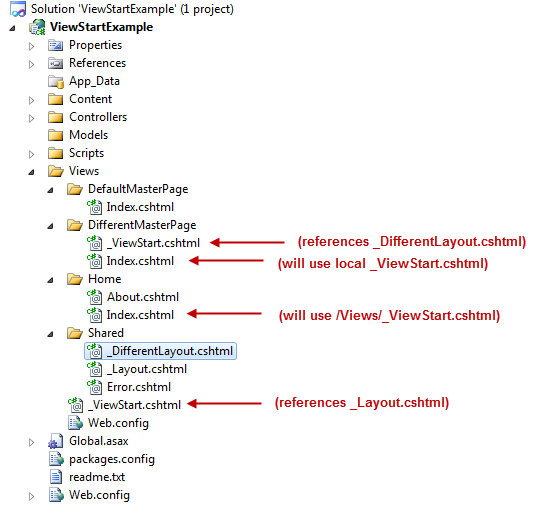
Now that you understand the basic use of _ViewStart.cshtml file lets go over the scope applied to these files.  The _ViewStart.cshtml file will affect all views in the same directory and below the location of it.  Also you can have another _ViewStart.cshtml file under a sub-folder which will be executed after the top level _ViewStart.cshtml.  Using this feature you can in effect override the top level _ViewStart.cshtml with one closer to the view.

ViewStartExample


Now when the Index.cshtml View under the Home folder is rendered, it will first execute the /Views/_ViewStart.cshtml file and then it will render the Index.cshtml View.

However, when the Index.cshtml View under the DifferentMasterPage folder is rendered, it will first execute the /Views/_ViewStart.cshtml file, then it will execute the /Views/DifferentMasterPage/_ViewStart.cshtml file, and then it will render the Index.cshtml View.